Salesforce and NetSuite Integration: Secure CRM and ERP Synchronization
Case study: how AT Vault implemented a bidirectional integration between Salesforce and NetSuite to unify sales, operations, and billing with traceability, security, and real-time synchronization.
The challenge: connecting two business ecosystems without losing traceability
In organizations where data is constantly being updated, ensuring that CRM and ERP systems remain synchronized is critical. Salesforce and NetSuite are leaders in their respective categories, but integrating them securely and with full traceability requires strategy, architecture, and expertise.
AT Vault was brought in to unify customer, quote, order, and billing management across both systems, eliminating manual tasks and ensuring real-time data consistency.
The goal: a secure, scalable, bidirectional integration. We designed and implemented a complete integration between Salesforce and NetSuite, using native technologies and open standards to enable reliable, traceable communication between both systems.
The solution: two synchronization channels
- Outbound (Salesforce → NetSuite): integration via SOAP SuiteTalk 2022.2 with Token Based Authentication (TBA), to send key records from Salesforce to NetSuite.
- Inbound (NetSuite → Salesforce): Apex REST JSON endpoints that receive information from NetSuite, deserialize it, and update Salesforce objects through automatic upserts.
The result: seamless, secure, and modular synchronization, ready to scale as the business grows.
Technical architecture: simple, modular, and built to scale
Integration architecture
The architecture we designed was based on four layers:
- Activation: Apex triggers that detect changes and initiate outbound flows.
- Orchestration: specialized handlers that structure data and logic.
- Transport: HLP_NetSuiteCallout helper with TBA signing and HTTPS management.
- Persistence: correlation between Salesforce ↔ NetSuite records using external IDs.
This modular model makes it easy to extend the integration to new objects or processes without affecting the solution’s core.
Main integration flows
The integration covers the complete customer, sales, and billing lifecycle:
Salesforce → NetSuite
- Account → Customer: Each record created or updated in Salesforce creates or updates a Customer in NetSuite through a TBA-signed SOAP request. The internalId returned by NetSuite is stored in Salesforce to support future synchronization.
- Contact → Contact: Contacts associated with accounts are automatically replicated and updated, ensuring consistency between the CRM and ERP.
- Quote → SalesOrder: When a quote moves to Accepted status, Salesforce creates a SalesOrder in NetSuite with all corresponding items and amounts, executed asynchronously using @future(callout=true).
NetSuite → Salesforce
- SalesOrder → Order / OrderItem: Orders created in NetSuite are sent to Salesforce through Apex REST, creating Orders and OrderItems that are automatically linked to the original Quotes.
- Invoice → Invoice: Invoices issued in NetSuite are integrated into Salesforce within the custom Inovice__c object, including amounts, currency, and the relationship with the associated order.
- Item → Product2 + PricebookEntry: NetSuite products are synchronized with Salesforce, automatically creating or updating their corresponding records in Product2 and the Standard Pricebook.
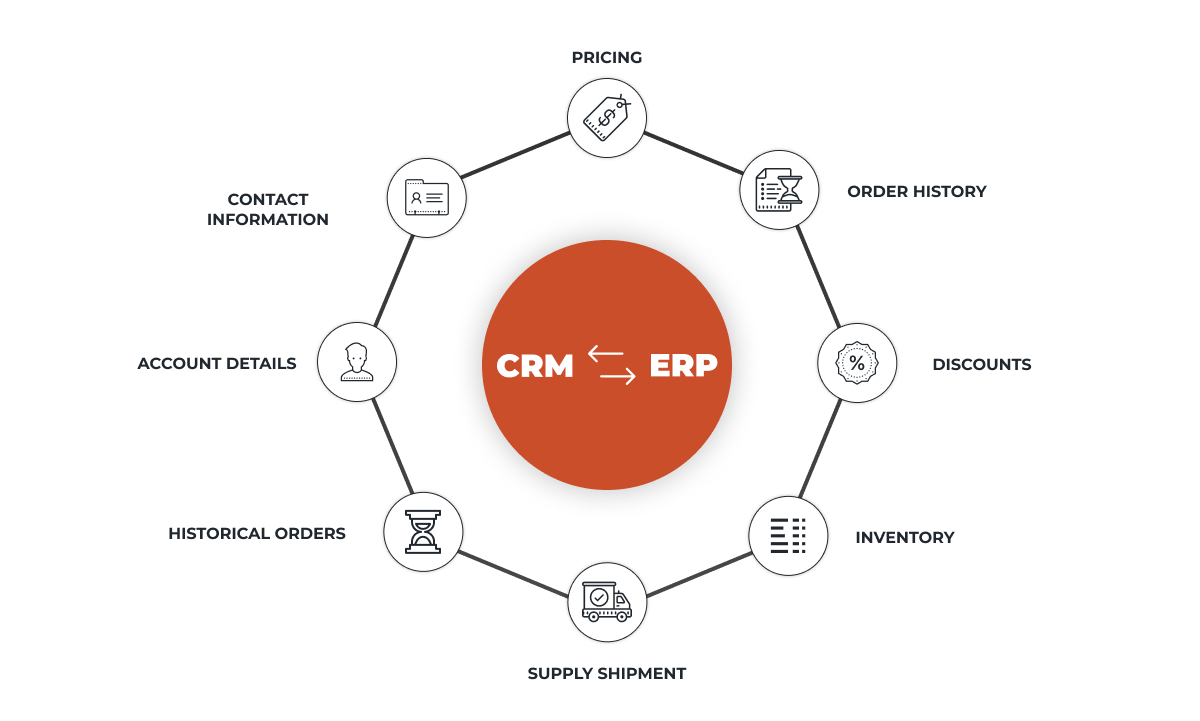
Salesforce and NetSuite integration architecture for synchronizing CRM and ERP through secure bidirectional flows.
Technical intelligence: asynchronous processing, idempotency, and consistency
The architecture we implemented ensures consistency and resilience in the event of failures through an approach based on:
- Asynchronous processes that optimize performance and prevent blocking in complex transactions.
- Technical correlation keys (such as ID_NetSuite__c or NTS_fld_internalIdNTS__c) to ensure idempotency and prevent duplicates.
- Catalog synchronization that automatically updates products, prices, and relationships between standard and custom objects.
Integration security was one of the project’s fundamental pillars:
Security was one of the integration’s fundamental pillars. Robust authentication mechanisms and controlled permissions were used to protect communication between Salesforce and NetSuite.
- TBA (Salesforce → NetSuite): HMAC-SHA256 signatures over HTTPS.
- OAuth 2.0 (NetSuite → Salesforce): integration user with controlled permissions.
Thanks to this configuration, communication between the systems meets the highest corporate security standards.
Results and benefits
The implementation achieved complete automation of commercial and accounting workflows, delivering tangible results:
| Result | Impact |
|---|---|
| ⏱ Reduced operating time and human error | -60 % in manual tasks |
| 🔁 Real-time synchronization | CRM + ERP always aligned |
| 👁 360° customer view | Unified data across all departments |
| ⚙️ Technical scalability | Architecture built for growth |
The project reduced administrative processing time by 60 %, eliminated duplicate records, and provided complete traceability from opportunity to invoice. This had a direct impact on the productivity of the sales and finance teams.
What did we learn from this integration?
Case study: how AT Vault implemented a bidirectional integration between Salesforce and NetSuite to unify sales, operations, and billing.
- Define the system of record for each object: customers, products, orders, and invoices.
- Use external IDs to maintain correlation between platforms.
- Design idempotent processes to prevent duplicates.
- Separate business logic, transport, and persistence.
- Log errors and responses to simplify support and auditing.
Key takeaways from this case
Integrating Salesforce and NetSuite is not only possible—it is strategic. With a well-designed architecture, the integration can scale without sacrificing control or security.
At AT Vault, we help companies connect their business ecosystems through secure, modular, and traceable integrations.
Frequently asked questions
How long does a Salesforce-ERP integration like this take?
A complete bidirectional integration like this case takes 6 to 12 weeks, depending on the business rules. A phased version, starting with read-only access, delivers value within the first month.
What does it mean for an integration to be idempotent?
It means that if the same message is processed twice—because of a retry or network failure—the result remains the same: customers and orders are not duplicated. It is the number one technical requirement for a reliable integration.
Does this pattern work for other ERPs?
Yes: the architecture—entity-specific channels, queues, and reconciliation—applies equally to SAP Business One, Tango, or Odoo. The connector changes, but the pattern does not. We have a general Salesforce-ERP integration guide in Resources.
Do you need to integrate Salesforce with NetSuite or another ERP?
At AT Vault, we can help you assess your processes, define the integration architecture, and build a secure, traceable solution designed to scale.
Go deeper
How to Put Your First AI Agent into Production in 30 Days
The four-week plan we use with clients: choose the use case, build the knowledge base, connect the channel, test with r…
GuideHow to Build a Knowledge Base That Helps an AI Agent Respond Accurately
There is an uncomfortable truth about AI agents: 80% of the outcome depends on the information you provide, not the tec…
Case studyHow We Work: Vaulty + Time Tracker in a Multi-Client Operation
How we organize our multi-client operation with Vaulty and Time Tracker: task board, team workload, skills, and client…
Keep reading
How to Migrate from Workflows and Process Builder to Flows in Salesforce
Salesforce is positioning Flow as its primary tool for declarative automation. In this guide, we explain why you should…
SalesforceSalesforce Sales Cloud and Lead Management: How to Turn Leads into Real Opportunities
With Salesforce Sales Cloud, you can automatically centralize, qualify, and assign leads, preventing contacts from slip…
SalesforceWhat Should I Know Before Buying a CRM?
Many of us begin the process of purchasing a CRM without fully understanding what it is or what it can do for us and ou…