How to automate WhatsApp with artificial intelligence without losing human control
In Argentina, WhatsApp is THE channel where sales are decided. We show you how to automate it with an AI agent that responds instantly and hands off to a person when needed, without losing control.
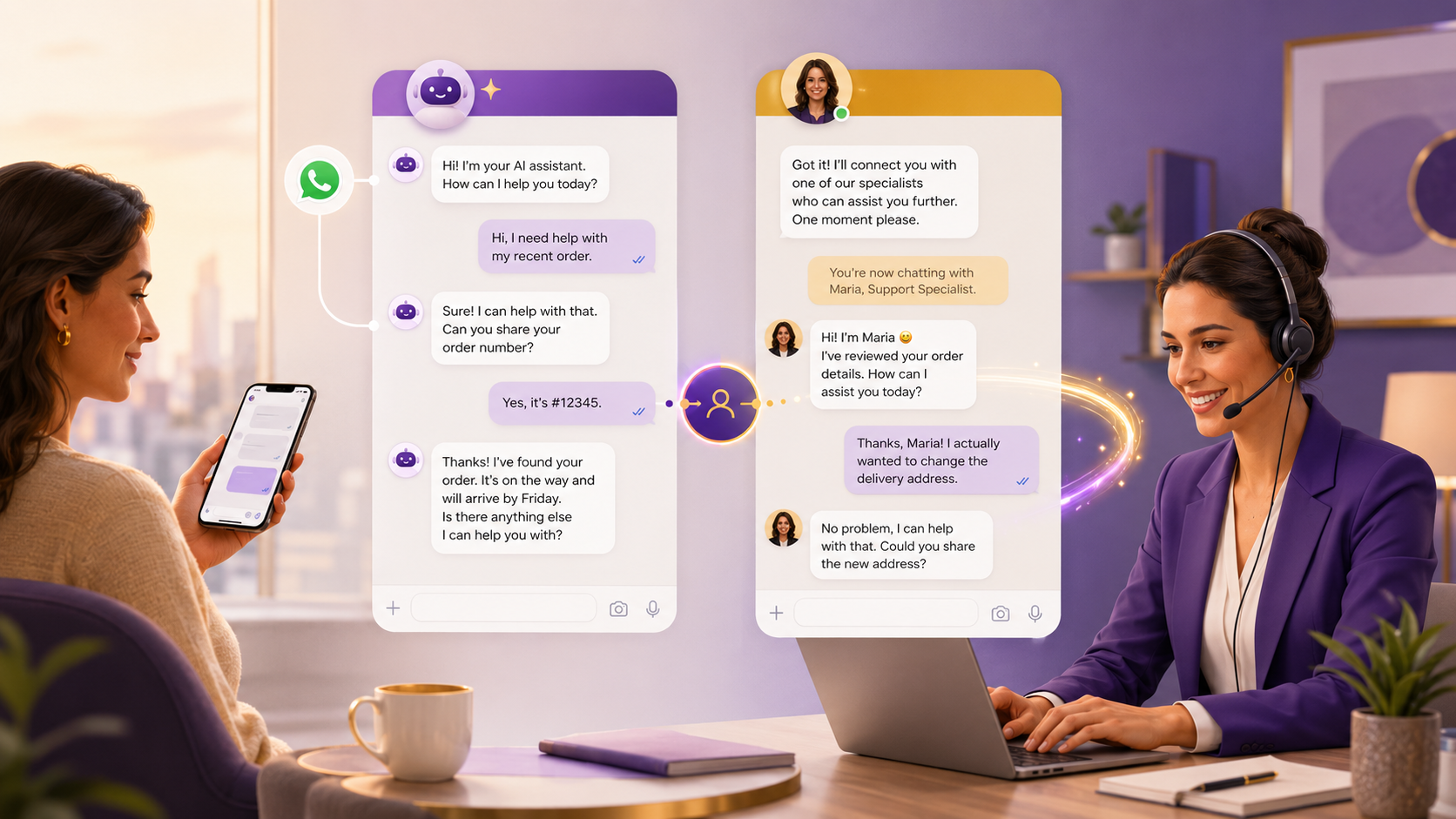
Executive summary
In Argentina and much of Latin America, WhatsApp is not just another channel: it is the channel. It is where customers ask for prices, request an invoice, file a complaint, book an appointment, and decide whether to buy. The problem appears when that volume grows faster than the team: messages answered three hours later, repeated questions that consume the day, sales that go cold because no one responded in time, and a business owner answering the phone at eleven at night.
Automating WhatsApp with artificial intelligence solves that bottleneck, but the right question is not "should I add a bot?". The question is: how do I respond faster and to more people without making the customer feel like they are talking to a cold machine, and without losing control over the conversations that truly matter? That is what separates an annoying bot from an AI agent that sells and builds loyalty.
The practical answer is a hybrid model: an AI agent that handles only repetitive, low-risk tasks—and does them well, using your business’s real information—while escalating to a person at the exact moment human judgment is needed. It is not about replacing your team. It is about helping your team stop losing hours on tasks that can be automated, so they can focus on closing, solving issues, and protecting the relationship.
The real problem: manual WhatsApp does not scale
Almost every SME starts with the WhatsApp Business app on a mobile phone. It works perfectly… until it stops working. The symptoms are always the same:
- Messages left unanswered outside business hours, right when the customer is ready to buy.
- The same five questions answered fifty times a day (price, hours, payment methods, address, stock).
- One phone, one chat owner: if that person is busy or on vacation, the channel comes to a halt.
- No traceability: there is no visibility into how many inquiries came in, how many converted, or where they were lost.
The cost of this is not theoretical. An inquiry that takes hours to answer is often a sale lost to a competitor that responded faster.
What "automating without losing control" means
This is the core idea of the article, and what defines a good implementation. Automation is not delegating everything to a machine. It is distributing work intelligently:
| What the AI agent handles | What remains human |
|---|---|
| Answering FAQs with official information | Negotiating price or special terms |
| Providing prices, hours, stock, and payment methods | Handling a sensitive complaint or an upset customer |
| Qualifying the lead and understanding what they need | Closing a complex or high-ticket sale |
| Booking appointments or meetings | Making decisions that commit the business |
| Recording the conversation and routing it to the right area | Any case the agent flags as "I’m not sure" |
The golden rule: the agent never improvises about what it does not know, and escalates to a person as soon as it detects that the conversation requires it. An angry customer, a question about sensitive data, a strong purchase intent, or any exception triggers the handoff to a human. Done well, the customer does not even notice where the agent ends and the person begins: the conversation flows.
How it works in practice
For this to truly work, three components need to be properly addressed. They are not complicated, but skipping any one of them is the difference between a useful agent and a frustrating one.
- The official connection to WhatsApp. For a business, the right approach is to use the official WhatsApp Business platform (the API), not solutions that automate a mobile phone from the outside. Why does it matter? Because unofficial solutions violate Meta’s terms and can get your number blocked overnight—along with all your contacts and history. The official route also respects key rules, such as the 24-hour window: within 24 hours of the customer writing to you, you can respond freely; outside that window, if you want to start the conversation, you need templates approved by Meta. Handling these rules properly is part of doing things seriously.
- The knowledge base. An AI agent is only as good as the information you give it. This is not about programming responses one by one, but about loading the real knowledge of the business: catalog, prices, policies, FAQs, and brand tone. The agent consults that information to respond accurately instead of making things up. If the information is outdated or incomplete, the agent will fail; if it is well curated, it will respond better than a new employee in their first week.
- The escalation rules. Before turning anything on, you need to define when the agent stops responding and hands the conversation over to a person. This is defined once and adjusted through usage. It is what gives you the "control" in the title.
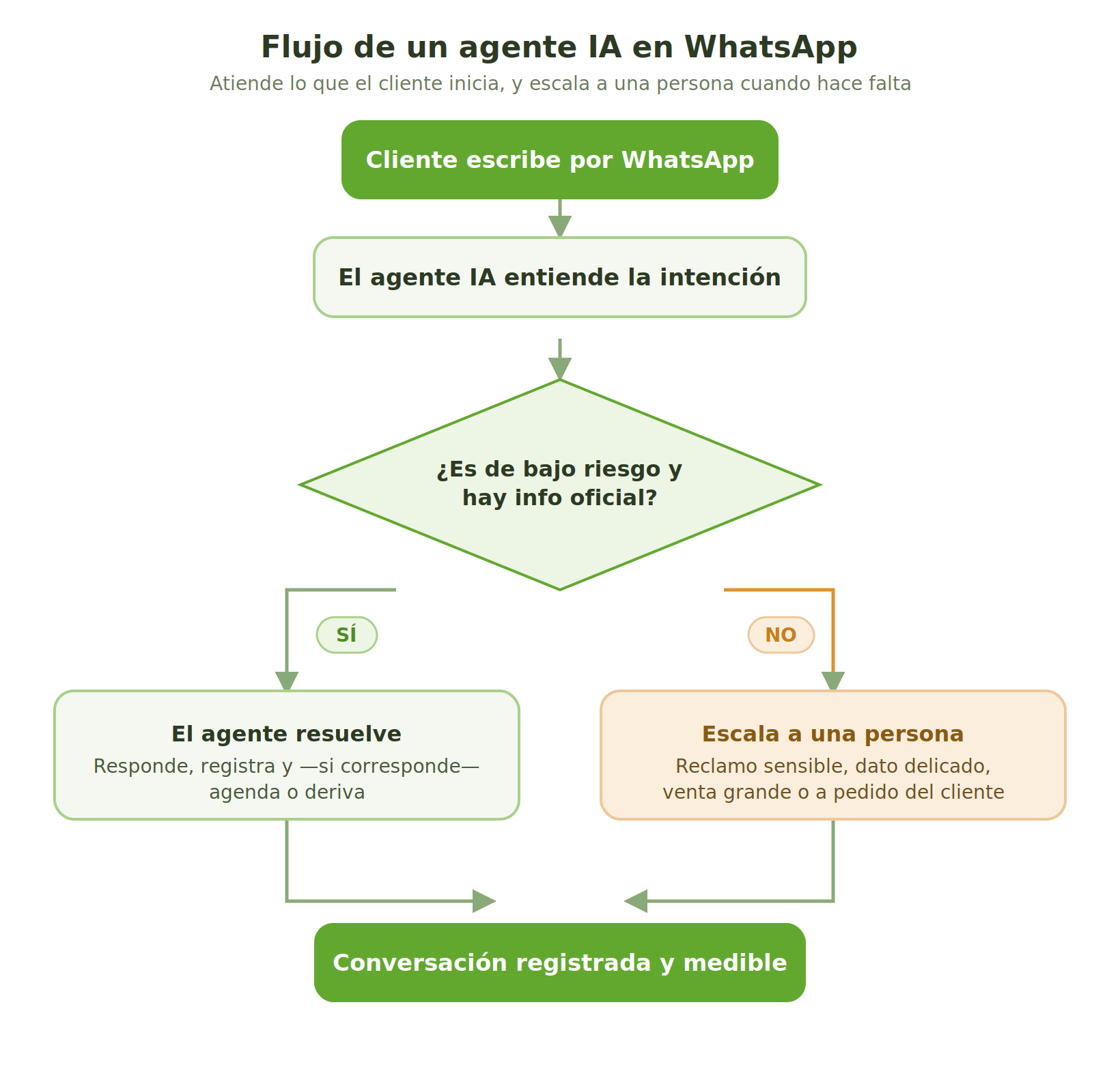
Flow of an AI agent on WhatsApp: the customer writes, the agent understands the intent, resolves it if it is low risk or escalates to a person, and the conversation is recorded and measurable.
Specific use cases for your business
Not everything is automated the same way. These are the three areas where returns appear fastest:
Sales. The agent responds instantly, 24/7, qualifies the prospect ("what are you looking for?", "when do you need it?", "what budget are you working with?") and passes only worthwhile leads to the salesperson, already with context. The salesperson stops wasting time filtering casual inquiries and focuses on closing. First response speed—going from hours to seconds—is often the factor that moves conversion the most.
Customer service and support. The agent handles repetitive inquiries (order status, hours, how to complete a process, where my invoice is) right away. The support team keeps the cases that require judgment. The customer gets an immediate answer instead of waiting; the team works on what matters.
Scheduling. For appointment- or meeting-based businesses, the agent coordinates availability, schedules, and confirms, without back-and-forth. This alone frees up hours per week in many industries.
How to start: a pilot, not an endless project
The most expensive mistake is trying to automate everything from the start. The strategy that works is the opposite: choose one high-volume, low-risk use case, do it well, measure it, and only then scale.
| Stage | What to do |
|---|---|
| Week 1 | Choose the case (e.g., answering frequent sales inquiries) and gather the official information |
| Week 2 | Load the knowledge base, define the tone, and set the rules for escalation to a human |
| Week 3 | Connect WhatsApp through the official route and launch the agent in a limited mode |
| Week 4 | Measure results, adjust responses, and decide what to automate next |
In one month, you have real evidence of whether this works for you, without committing a large budget or months of work.
KPIs worth tracking
Do not measure "number of messages answered by the bot". That says nothing about the business. Track this instead:
| KPI type | Metric |
|---|---|
| Speed | First response time (goal: seconds, not hours) |
| Resolution | % of inquiries resolved without human intervention |
| Quality | % of conversations the customer ends satisfied / without filing a complaint |
| Business | Qualified leads and inquiries that result in a sale or appointment |
| Control | % of cases correctly escalated to a person |
Risks to avoid
- Using unofficial automation. It is the fastest way for Meta to block your number. Always use the official route.
- Launching the agent without escalation rules. An agent that insists on answering what it does not know creates more frustration than silence.
- Loading outdated information. The agent will repeat your mistakes at scale. The knowledge base must stay alive.
- Over-automating the relationship. There are moments—a serious complaint, an important sale—when the customer needs to feel there is a person involved. Recognizing that is part of the design, not a flaw.
- Robotic tone. The agent needs to speak like your brand. In a relationship-driven business, a stiff agent feels out of place.
Final recommendation
Automating WhatsApp with AI is not about adding a bot that responds with a rigid script. It is about giving your business the ability to respond instantly, at any time, with the right information, and to pass on to your team only what truly requires a person. Done well, it does not cool the customer relationship: it improves it, because no one is left waiting.
This is exactly what Vaulty does: an AI agent connected to your WhatsApp through the official route, that learns from your business’s real information, responds in your brand’s tone, and knows when to step aside so a person can intervene. No endless projects or technical teams: you start with one case, measure it, and scale.
Try Vaulty with a WhatsApp pilot for your business. We help you choose the first use case and measure results in 30 days.
Frequently asked questions
What do I need to automate WhatsApp with AI?
Three things: WhatsApp Business API (a number verified with Meta), an agent platform that connects to that channel, and your curated knowledge base. With that, a first agent can go into production in 30 days.
Does the agent answer anything?
No — and that is where the control lies: you define which topics it handles, what it does not answer, and when it routes the conversation to a person with the conversation context. The customer is never trapped in a loop.
How much does it cost to automate WhatsApp?
With Vaulty, from USD 199 per month plus a one-time USD 1,000 implementation; WhatsApp messages are billed separately at Meta’s rates1. The right measure is to compare it against the hours your team spends answering the same things every day.
Notas
Do you want to automate your WhatsApp without losing human control?
At AT Vault, we implement it with Vaulty: an AI agent that instantly answers inquiries initiated by your customer and routes them to your team when needed. We start with a focused case, measure it, and scale
Go deeper
How to Put Your First AI Agent into Production in 30 Days
The four-week plan we use with clients: choose the use case, build the knowledge base, connect the channel, test with r…
GuideHow to Build a Knowledge Base That Helps an AI Agent Respond Accurately
There is an uncomfortable truth about AI agents: 80% of the outcome depends on the information you provide, not the tec…
Case studyHow We Work: Vaulty + Time Tracker in a Multi-Client Operation
How we organize our multi-client operation with Vaulty and Time Tracker: task board, team workload, skills, and client…
Keep reading
What Should I Know Before Buying a CRM?
Many of us begin the process of purchasing a CRM without fully understanding what it is or what it can do for us and ou…
SalesforceHow to Migrate from Workflows and Process Builder to Flows in Salesforce
Salesforce is positioning Flow as its primary tool for declarative automation. In this guide, we explain why you should…
SalesforceSalesforce Sales Cloud and Lead Management: How to Turn Leads into Real Opportunities
With Salesforce Sales Cloud, you can automatically centralize, qualify, and assign leads, preventing contacts from slip…